How Do I Choose Furniture for a Small Home Office? A Practical Guide
How to Choose Furniture for a Small Home Office
A small home office has to do serious work without taking over the room.
So, how do you choose furniture for a small home office? Start with the
work you need to do and the space you actually have---not with the
smallest desk you can find. Measure the usable footprint, identify your
equipment, and choose the desk and chair first. Then add storage that
uses the walls or serves more than one purpose. Test the layout for
comfortable movement, and finish with styling that keeps the room calm.
This planning-first approach helps you create a workspace that feels
intentional and useful.
Start With the Room---and the Work You Need It to Do
Before shopping, measure the area as it exists. Record the width and
depth of the office, nook, or closet, along with door swings, windows,
baseboards, outlets, vents, and any furniture that must remain. A guest
room with a generous footprint may offer less usable space than expected
once a bed, closet door, and radiator are accounted for. Pay attention
to the space required for the chair, not only the furniture's footprint.
Draw proposed desk and storage pieces on paper or mark them with
removable tape on the floor. Leave enough room for the chair to move,
drawers to open, and you to reach an outlet without twisting around
furniture. Next, define the primary task. A laptop user who answers
email occasionally will need a different arrangement from someone
managing dual monitors, writing by hand, meeting clients on video, or
storing paper files. List everything that needs a home: monitors,
keyboard, mouse, printer, task light, speakers, chargers, notebooks, and
reference materials. This prevents a common small-office mistake: buying
an attractive desk that cannot support the way you work. A compact
writing desk may suit a laptop and notebook, while a deeper surface---or
a nearby cabinet---may be more appropriate for paperwork and equipment.
Choose the Desk Around Your Primary Task
The right small desk is the smallest surface that supports your actual
work comfortably. Smaller is not automatically better. A desk that is
too narrow can leave the monitor, keyboard, mouse, and paperwork
competing for the same few inches. Consider these formats: - A writing
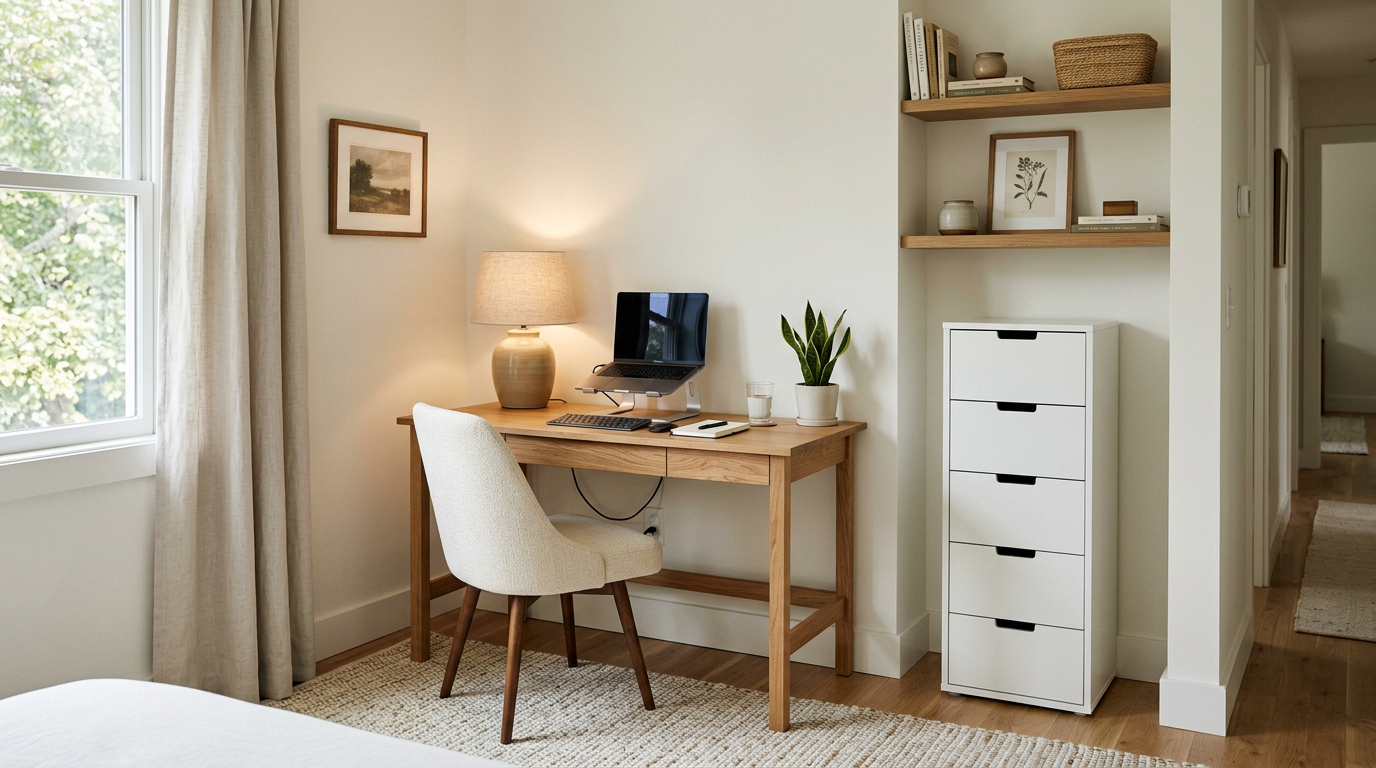
desk works well for a laptop, notebook, and a few daily supplies while
keeping the room visually light. - A narrow rectangular desk fits
efficiently along a wall, especially in a bedroom or living area. - A
corner desk can use an awkward junction, but make sure the corner
remains reachable rather than becoming a heavy, inaccessible block. -
A wall-mounted or floating surface preserves floor space, though it
may offer less storage and may not suit substantial equipment. - A
desk with integrated drawers can replace a separate storage unit,
provided the drawers do not interfere with legroom. - A
secretary-style piece can conceal work materials when the office is
part of a living room. Its opening surface must still support your
equipment comfortably. For laptop work, think beyond the computer's
closed dimensions. If you use it for several hours, a separate keyboard
and mouse or an external monitor may allow the screen and input devices
to sit in more comfortable positions. Because a laptop's screen and
keyboard are connected, positioning both well can otherwise be
difficult. If you use two monitors, write frequently, or keep paper
documents open, prioritize usable surface area before adding
accessories. A monitor arm, vertical stand, or nearby console can free
part of the desk, but check the desk's stability, weight limits, and
installation instructions. Judge desk height by your body position
rather than a number alone. Cornell's ergonomics
guidance identifies
approximately 28 to 30 inches as a common writing-surface range for many
adults, but people differ in height, proportions, and working habits.
Your elbows should stay near your body, your shoulders relaxed, and your
feet supported when the desk and chair are used together.
Select a Chair That Fits the Room and the User
The chair deserves as much attention as the desk. A chair that looks
slim may be uncomfortable for extended work, while a large
executive-style chair may overwhelm the room and prevent you from moving
close enough to the desk. For a small office, prioritize fit and
adjustability over visual scale alone. Look for a chair with adjustable
seat height and stable back support. Seat depth, lower-back support, and
the chair's overall footprint should suit both your body and the
available floor area. When seated, aim for a supported lower back,
relaxed shoulders, relatively neutral wrists, and feet resting on the
floor or a suitable footrest. These are adjustment goals, not rigid
measurements. Armrests can be helpful for some users, but they are not
essential if they force your shoulders upward or prevent the chair from
approaching the desk. Test the chair with the intended desk whenever
possible. Check that the seat can tuck under the surface, the back does
not collide with the wall, and the casters or legs do not catch on a
rug. A dining chair may be reasonable for short periods or occasional
use; it is less sensible to choose one solely because it takes up less
visual space if you will sit there most of the day. Before deciding that
a desk technically fits, pull the chair out, sit down, and simulate your
normal work. Reach for a notebook, turn toward a printer, and stand up.
This simple test can reveal problems that a floor plan misses. OSHA's
computer workstation
guidance provides
additional considerations for arranging a workstation.
Use a Layout That Protects Movement
Furniture arrangement can make a compact office feel orderly or
obstructed. Keep the main path, door swing, windows, vents, and
frequently used storage accessible. The goal is to create a clear work
zone, not to fill every available wall. A desk-against-the-wall layout
is usually efficient and easy to plan. It can simplify cable routing and
leave the center of the room open. Consider what you will face during
the workday, however. A wall may suit focused work, while a
perpendicular position near a window may provide a more open outlook and
useful side light. If you place the desk near a window, observe the room
at different times of day. Direct sunlight can create screen glare, and
a window behind you may reflect in video calls. Side light is often
easier to manage, though shades and monitor position still matter. A
corner layout makes sense when two walls can support a broader work
surface without taking over the center of the room. Use the corner for
equipment or less frequently reached items rather than allowing it to
become an inaccessible pocket. For a closet office or hallway nook,
consider a shallow surface, vertical storage, and a chair that can fully
clear the opening when the space serves another purpose. A fold-away
arrangement can work well for occasional use if setting up and putting
away the equipment is simple enough to happen consistently. In a shared
bedroom or living room, use furniture to define the work area without
blocking circulation or natural light. A compact desk beside a cabinet
may feel more integrated than a freestanding office suite. In a guest
room, choose pieces that can continue serving the room when visitors
arrive rather than adding furniture with only one occasional use.
Plan Storage for the Items You Actually Use
The best small-office storage plan begins with a hierarchy. Keep daily
items within easy reach, weekly supplies nearby, and archival materials
somewhere less prominent. This keeps the desk available for work instead
of turning it into a permanent supply shelf. Vertical shelving, wall
cabinets, narrow drawer units, rolling carts, and under-desk storage can
increase capacity without expanding the central footprint. Measure depth
as carefully as width. A deep cabinet may hold more, but it can reduce
circulation and make a small room feel crowded. Use open shelving for
attractive, frequently used, or display-worthy items. Closed cabinets
are often better for printer paper, cables, packaging, files, and other
supplies that create visual noise. A deliberate mix can make the office
feel lighter without requiring every object to be perfectly arranged.
Use the wall above the desk selectively. Shelves can hold reference
books and a small lamp, but a crowded backdrop may make video calls feel
busy and the room appear more enclosed. Plan the printer and charging
area before purchasing a desk with drawers or shelves. A narrow cabinet
or rolling unit can keep equipment close without forcing it onto the
desktop. Tall or top-heavy storage should be secured according to the
manufacturer's instructions. The U.S. Consumer Product Safety
Commission
recommends anchoring furniture that could tip and removing objects from
the top that might encourage children to climb. This is relevant in a
home office that children visit, even if it is not primarily a play
space.
Make the Workstation Comfortable in a Small Footprint
Once the furniture is in place, adjust the workstation around your body.
Position the monitor at or just below eye level so your head and neck
can remain balanced over your torso. Center the monitor and main typing
area to you, not simply to the physical center of the desk. Keep the
keyboard and mouse close enough that your elbows remain near your body
and your wrists stay relatively neutral. A monitor riser, arm, laptop
stand, separate keyboard, or footrest can solve a specific positioning
problem without requiring a larger room. A laptop user might place the
computer on a stand, connect an external keyboard and mouse, and keep a
notebook to one side. Someone using one monitor for design work may
instead need a stable, deeper surface with clear space for a tablet or
documents. The furniture decision should follow that setup. Give the
arrangement several days before deciding that it works. Notice whether
you reach forward for the mouse, turn your neck toward a second screen,
or run out of space when writing. NIOSH
guidance recommends changing
posture, avoiding prolonged awkward positions, and taking periodic
breaks. Stand, walk briefly, or shift tasks at regular intervals.
Persistent pain, numbness, or other symptoms should be addressed with an
appropriate medical or ergonomics professional.
Refine the Look Without Making the Room Feel Busy
A small office benefits from visual restraint, but restraint does not
mean bland. Repeating one material, finish, or quiet color through the
desk, shelving, and accessories can make different pieces feel
connected. Natural wood can bring an aesthetic sense of warmth to a
compact workspace, particularly when balanced with linen, cotton,
ceramics, or restrained metal details. Limit desktop accessories to
items that support your work or contribute clear visual value. A small
lamp, useful tray, and a few personal objects may be enough. Keep cables
organized, especially when the desk sits in a bedroom or living room.
Treat lighting as part of the furniture plan. Combine general room light
with task lighting, and position the lamp so it does not reflect on the
screen or cast a shadow across your writing hand. A rug can help define
a work zone in a shared room, but test it with the chair before
committing. A low-pile or flat construction is generally easier for an
active chair to move across than a thick, loose pile. Confirm that the
rug does not interfere with the door or create an unstable edge.
Use This Final Small-Office Furniture Checklist
Before ordering, review the complete arrangement rather than each piece
in isolation: - Does every item fit the measured footprint, including
chair movement, drawers, and doors? - Does the desk support your actual
equipment and primary tasks? - Can the chair be adjusted so your back,
shoulders, wrists, and feet are supported comfortably? - Is there a
clear home for papers, chargers, printer supplies, and less-used
items? - Will tall or top-heavy storage be secured where appropriate? -
Can you use the desk without blocking a window, vent, outlet, or the
room's main path? - Does the furniture suit the surrounding bedroom,
living room, or guest space? - Are you solving a real storage or work
problem, or filling an empty wall simply because space is available?
Make the Decision in the Right Order
The best furniture for a small home office is not necessarily the
smallest desk or the most multifunctional piece. It is the combination
that supports your work, fits the room's measured geometry, and leaves
enough room for comfortable movement. Buy in order: desk and chair
first, storage second, styling last. Test the workstation with your real
equipment and make adjustments after a few days. For pieces that
complement the rest of your home, explore Mercer & Gray's furniture
collection.